ads

Showing posts with label RAID information. Show all posts

RAID 2, RAID 3, RAID 4 - What are the characteristics, and how does it work? And its history

RAID 2, RAID 3, RAID 4 – what it is, how it works? The history lesson


After RAID 0 and RAID 1 (with RAID 1+0 and RAID 0+1) it is time for RAID 2, 3 and 4. Here we present a small description of the mentioned levels. We hope it will outline a picture of the functionality of these solutions. Although the article is a kind of history lesson – these solutions are no longer used – it is good to be aware of the origins of modern storage technologies.

RAID 2 – the bit-level striping with dedicated Hamming-code parity

In the case of RAID 2 all data are stripped (to the bit levels – not block). Each bit is written on a different drive/stripe. Such a solution requires the use of Hamming code for error correction.
Hamming code is a linear error-correcting code named after its inventor, Richard Hamming. Hamming codes can detect up to d – 1 bit errors, and correct (d – 1) / 2 bit errors, where d is the minimum hamming distance between all pairs in the code words; thus, reliable communication is possible when the Hamming distance between the transmitted and received bit patterns is less than or equal to d. By contrast, the simple parity code cannot correct errors, and can detect only an odd number of errors.
source
The number of discs in RAID 2 used to store information is equal to the logarithm of the number of discs that are protecting the mentioned data. All disks in RAID 2 work as one disk which has a capacity equal to the common capacity of all disks used to store data.

RAID 2, RAID 3, RAID 4 - what it is, how it works? The history lesson

RAID 2
While RAID 2 is being used it is important to synchronize all disks. Such a solution requires that the controller, which makes disks, will spin at the same angular orientation – in other way the index will not be reached at the same time. Disintegration will lead to total uselessness of drives in array.
Such a requirement is not the only drawback. Also the need for long Hamming code generation may prove to be problematic by slowing the whole system down.
The mode of RAID 2 action may be hard to understand. The need for using Hamming code, special controllers for disks – it makes RAID 2 a not very popular solution. But if we think about it in a less pragmatic way, it may prove to be very interesting – mainly due to its modus operandi. It introduces many more complex solutions than RAID 0 and RAID 1. While everything works well, RAID 2 proves to be quite a good solution in area of data security. In case of HDD failure – no matter if it was the disk with data or the Hamming code – any part of the array may be reconstructed by the other disks used.
While it is interesting and it has its advantages, we have not heard about any commercial implementations of RAID 2. Solutions based on it were used only in the initial phase of RAID systems usage – before disks were equipped with their own correction code. Modern HDDs use various correction and optymalising algorithms. That is why the Hamming system has started to be less interesting in the area of professional usage and it is no longer implemented in modern controllers.

RAID 3 – another rare one in practice

RAID 3 works as RAID 0 does – it uses byte-level stripping – but it also uses an additional disk in the array. It is used to store checksums and it supports a special processor in parity codes calculating – so we may call it “the parity disk”.

RAID 2, RAID 3, RAID 4 - what it is, how it works? The history lesson

RAID 3
In RAID 3, configuration data are divided into individual bytes and then saved on a disk. Parity byte is determined for each row of data and saved on the mentioned “parity disk”. In case of failure it allows to recover data by an appropriate calculation of the remaining bytes and parity bytes that correspond with them.
Although RAID 3 is rarely used in practice, it is worth pointing out its advantages. First of all is its resistance to damage of one disk in the arrangement. Secondly, high read speed. Unfortunately, it also has a couple of drawbacks.
The read speed is more than satisfactory but write speed is on the contrary – the reason being the necessity of checksums calculating (even RAID hardware controllers cannot solve this problem). She second disadvantage is a matter of disk failure. When it happens, the whole system will work much slower. What is more, although RAID 3 is resistant to breakdown (in case of failure of one disk in the array), replacing a damaged disk is very costly. A third problem is the disk used for calculating checksums  – it is usually the bottleneck in the performance of the entire array.
As can be easily seen, RAID 3 is not a good, reliable or cheap solution. Therefore, as it was mentioned earlier, its use is rare in practice. Systems based on RAID 3 are mostly purposed for implementations where a small number of users refer to the very large files.

RAID 4 – smells like RAID 3 and 5

RAID 4 is very similar to RAID 3. The main difference is the way of sharing data. They are divided in to blocks (16, 32, 64 lub 128 kB) and written on disk s – similar to RAID 0. For each row of written data, any recorded block is written on a parity disk. In short this means that RAID 4 does not strip data at  block levels but it uses byte levels for striping (block-level striping with a dedicated parity disk).
There are also similarities in relation to RAID 5, but it confines all parity data to a single drive. RAID 4 does not use distributed parity.
RAID 2, RAID 3, RAID 4 - what it is, how it works? The history lesson


RAID 4
RAID 4 requires at least three disks for complete implementation and configuration. What is more, it also needs hardware support for parity calculations. This makes it possible to recover data by the appropriate mathematical operations.
If we asked: what is RAID 4 for? we would point out one particular need. Such a solution will work very well in the case of really large files – when sequential read and write data process is used. Using RAID 4 for small portions of data would be not a good idea. The reason is the need to carry out modifications of parity blocks for each I/O session. The need for continuous repeating of such an operation would cause large losses of time and slow down a whole system.
RAID 3 and RAID 4 solutions were replaced by RAID 5. You can read about it in an article by Janusz Bąk: “How does RAID 5 work? The Shortest and Easiest explanation ever!”

What is RAID 1, RAID 1 + 0 and RAID 0 + 1


What are RAID 1, RAID 1+0 and RAID 0+1


What are RAID 1, RAID 1+0 and RAID 0+1
What is RAID 1, RAID 1 + 0 and RAID 0 + 1

This is the second article in a series of our RAID. We hope to show - in the easiest possible way - What is RAID, and the idea of ​​it and how it works. We wrote about RAID 0. Now is the time for RAID 1, RAID 0 + 1 and RAID 1 + 0.


What is RAID 1 

What is RAID 1, RAID 1 + 0 and RAID 0 + 1RAID 1 (copies) - The basic idea of ​​this solution is to repeat (copies) of two or more disks. This means that while the use of RAID 1, is created a replica (or mirror) on two or more disks. This solution gives a good read performance and reliability, but you should defragment storage capacity. The reason for this is that the total storage must be equal to the capacity of the smallest drive. Ie: in the case of a group consisting of 3 tablets - 250GM, 500GB and 1TB - will be usable space equal to 250 GB.


Why RAID 1

RAID 1 is the easy way to secure data and to maintain the reasonable value of reading, writing and access speed. Adoption of this strategy allows to maximize the full benefit of these processes. While it is sequential, and the speed of public writing is equal for all write operations from each drive in the array. It is a process at one time, and write operations take place in parallel with all of the drives - which means that the duration of the registration period is equal to the disk to run slower.

It is also possible to prepare this strategy to the process of reading. And can be serially - even reading speed can be almost equal to RAID 0 or it can only be done from the selected drives. The second solution is used when there are significant differences between the read speeds of each drive in the array.


But back to the Pros - The possibility to increase reading speed and reduce access time is the main advantage. The second is the integrity of the data. Wikipedia gives us a good and simple example:


Consider RAID 1 with two similar models of the drive with a 5% probability that the disk will fail within three years. Provided that the failure to be statistically independent, the probability of each of the disk failure during the three-year period is 0.25%. Thus, the possibility of losing all the data is 0.25% over a period of three years if nothing is done to the group. If the first disk failure is never replace, then there is a chance of 5% will be data loss. If only one of the disks fails, no data will be lost. As long as they failed disk is replaced by a second disk fails, the data safe.


However, since the two tablets are used identical and since the patterns used are also identical, their failure can not be assumed to be independent. Thus, the possibility of losing all the data, if not replace the first disk fails, you may be much higher than 5%.


In practice, a good management system in the above is irrelevant because it will not be hard to ignore the failed disk, but will be replaced. Is determined by the reliability of public order by the prospect of remaining engine will continue to work during the reform period, and this is the total time it takes to detect the failure, and the replacement of the hard drive failed, and that the campaign to rebuild. If, for example, it takes one hour to replace the failed drive is replaced, and the public knows the reliability of the system by the possibility of engine and the remaining disks operate for one hour without fail.


Source

It's also easy to see, and the possibility of data loss really small. This is the biggest advantage for RAID 1 - to allow for the issuance of a quick resolution to the rare possibility of data loss through disk failure.

However, there are also some drawbacks. As mentioned, a full range of storage capacity equal to the storage capacity of the smallest related disk. The second thing is something we can call and RAID 1 can prevent data loss due to disk failure, but in the virus or human factors case of "instant of writing and change the process." (Ie: accidental deletion of data) RAID 1 is useless. Changes at first will (two) in the disk array also take place in the second - immediately or soon. Will be the wrong one loss, malware or anything else and data.

What is RAID 0 + 1 and RAID 1 + 0


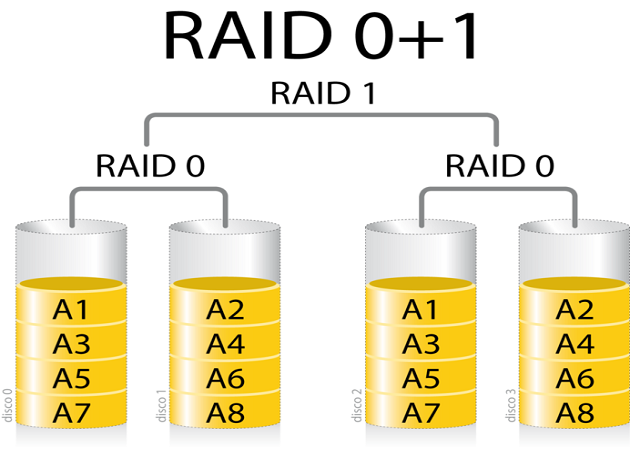
RAID 0 + 1 arrays means implemented in RAID 1, which is 0 RAID arrays elements. This implementation has speed RAID 0, RAID 1 safety benefits. It is also much easier to implement than RAID 3, RAID 5 or RAID 6. The main disadvantage of this solution is cost.

RAID 1 + 0

RAID 0 + 1

The implementation of RAID 1 + 0 set as RAID 0, who are RAID 1. It combines elements of the same advantages of RAID 0 (speed) and RAID 1 (safety), but in a different way. RAID 1 + 0 creates a large strip of small mirrors. After a disk failure, while being replaced, and the rebuilding of only a small part of a complete set. Unfortunately, it has the same drawback as that of RAID 0 + 1 - the cost of implementation.

What is RAID 0 General Information

What is RAID 0
raid0What is RAID 0
What is RAID 0We published an article about RAID 5: "How RAID 5 work? Shorter and
 easier to interpret than ever" - and now is the time for a full series. We will try to show you
, in a few words, and interpretation of the shortest record levels of RAID - 0, 1, 1 + 0, 0 + 1, 2, 3, 4, 6
 and matrix. Now is the time for RAID 0 - take a look ...

What is RAID 0
We can describe RAID 0 as the connection of the two (or more) physical disks - so as to look like a
logical drive and one engine. In such a case, and ability are all equal to the number of times the disk
 in the "smaller" one's ability. ie- if you have two hard drives - 250GB 500GB and, and the size of the
 array will be equal to 500 GB.

RAID 0 is called also "bar" or "stripping size" group. This is because it smells data (chart) between
 tablets - without symmetry to repeat information. In other words, RAID 0 does not provide data
 redundancy. Things, the settlement of data between disks leads to a significant acceleration in
 the read and write operations - because of these parallel operations on all disks in the array.

Pros and Cons
The ability of the full group as a whole. Through the implementation of such a solution, it is also
 possible to increase the speed of reading and writing (but only compared with one disc).

When we talk about RAID 0, it's also necessary to write about the negatives. The first is the issue
 of safety data. Is not designed like this method to prevent data loss. This means that a single disk
 failure may cause loss of all data contained in the matrix. Moreover, the data can be restored can
 be difficult because they are distributed on all disks. It is also impossible to retrieve the "blueprint"
 of data. Even when you use a special (and expensive) tools, data recovery can be incomplete and corrupt.

The second thing is the ability. Used even if two disks - 100 GB and 1 TB - will store set equal to
 200GB. So the use of disks with different capacities is uneconomical because of the inability to
 use the full storage potential.

RAID 0 is useful when
Because the only RAID interest 0 is the write / read speed, we can at one point only the rational
 use of it - to build a cheap and effective matrices and solutions use based on the RAID 1 + 0 or RAID 0 + 1.
Check it out for RAID 1 and RAID 0 + 1 and RAID 1 + 0 solutions.

How RAID 5 work? Shorter and easier to interpret than ever!


How RAID 5 work? Shorter and easier to interpret than ever!

We all have to lack of time to study the long and complex information about RAID theories, but you
 may be interested in how RAID 5 works. We made it easy for you by providing explain shorter and
 easier than ever before.

RAID 5 - How does it work?
First we need to remind you of the definition of XOR:

XOR result of the function is equal to 1 if all the arguments are different.

XOR (0, 1) = 1
XOR (1, 0) = 1

XOR output function is equal to 0 if all the arguments are the same.

XOR (0, 0) = 0
XOR (1, 1) = 0

Now let's assume we have 3 drives with the following bits:

| 101 | 010 | 011 |

I daresay XOR that data and put it on the CD 4

XOR (101, 010, 011) = 100 (XOR (101010) = 111, and XOR (111, 011) = 100

Therefore, the data on the four engines looks like this below:

| 101 | 010 | 011 | 100 |

Now let's see how it works XOR MAGIC. Let's assume the second drive failed. When we calculate
 XOR all the remaining data will be present from the engine missing.

| 101 | 010 | 011 | 100 |

XOR (101, 011, 100) = 010

You can check the other drives were missing, and will XOR of the remaining data always give you
 exactly the data from your missing disk.

| 101 | 010 | 011 | 100 |

XOR (101, 010, 100) = 011


What works for 3-bit and 4 drives only, and works for any number of parts and any number of drives.
 RAID 5 real has the most common form of 64K stripe size (65536 * 8 = 524288 bit)

Thus, the real XOR engine only needs to deal with the 524288-bit 3-bit and not, as in our practice.
 This is the reason that RAID 5 needs to be very effective XOR engine in order to calculate it quickly.

Even when you add one drive for parity will be able to re-build the lost data in the event of a drive failure.

In our example we have explained RAID 4, where a dedicated parity drive. RAID 5 will parities
 distributed evenly among all the drives. Provides parity distributed a slight increase in performance,
 but the magic XOR is the same.

To learn more about RAID 5 please go to the Wikipedia article.

info RAID 5

RAID


This article is about the data storage technology. For other uses,
RAID (originally redundant array of inexpensive disks; now commonly redundant array of independent disks) is a data storage virtualization technology that combines multiple disk drive components into a logical unit for the purposes of data redundancy or performance improvement.[1]
Data is distributed across the drives in one of several ways, referred to as RAID levels, depending on the specific level of redundancy and performance required. The different schemes or architectures are named by the word RAID followed by a number (e.g. RAID 0, RAID 1). Each scheme provides a different balance between the key goals: reliability,availability, performance, and capacity. RAID levels greater than RAID 0 provide protection against unrecoverable (sector) read errors, as well as whole disk failure.

§History

The term "RAID" was invented by David Patterson, Garth A. Gibson, and Randy Katz at the University of California, Berkeley in 1987. In their June 1988 paper "A Case for Redundant Arrays of Inexpensive Disks (RAID)", presented at the SIGMOD conference, they argued that the top performing mainframe disk drives of the time could be beaten on performance by an array of the inexpensive drives that had been developed for the growing personal computer market. Although failures would rise in proportion to the number of drives, by configuring for redundancy, the reliability of an array could far exceed that of any large single drive.
Although not yet using that terminology, the technologies of the five levels of RAID named in the paper were used in various products prior to the paper's publication,[3] including the following:
  • Around 1983, DEC began shipping subsystem mirrored RA8X disk drives (now known as RAID 1) as part of its HSC50 subsystem.
  • Around 1988, the Thinking Machines' DataVault used error correction codes (now known as RAID 2) in an array of disk drives. A similar approach was used in the early 1960s on the IBM 353.
  • In 1977, Norman Ken Ouchi at IBM filed a patent disclosing what was subsequently named RAID 4.
  • In 1986, Clark et al. at IBM filed a patent disclosing what was subsequently named RAID 5.
Industry RAID manufacturers later tended to interpret the acronym as standing for "redundant array of independent disks".

§Concept

Many RAID levels employ an error protection scheme called "parity", a widely used method in information technology to provide fault tolerance in a given set of data. Most use simple XOR, but RAID 6 uses two separate parities based respectively on addition and multiplication in a particular Galois Field or Reed–Solomon error correction.[14]

§Standard levels

Main article: Standard RAID levels
A number of standard schemes have evolved. These are called levels. Originally, there were five RAID levels, but many variations have evolved—notably several nested levelsand many non-standard levels (mostly proprietary). RAID levels and their associated data formats are standardized by the Storage Networking Industry Association (SNIA) in the Common RAID Disk Drive Format (DDF) standard:
RAID 0
RAID 0 consists of striping, without mirroring or parity. The capacity of a RAID 0 volume is the sum of the capacities of the disks in the set, the same as with a spanned volume. There is no added redundancy for handling disk failures, just as with a spanned volume. Thus, failure of one disk causes the loss of the entire RAID 0 volume, with reduced possibilities of data recovery when compared to a broken spanned volume. Striping distributes the contents of files roughly equally among all disks in the set, which makes concurrent read or write operations on the multiple disks almost inevitable. The concurrent operations make the throughput of most read and write operations equal to the throughput of one disk multiplied by the number of disks. Increased throughput is the big benefit of RAID 0 versus spanned volume.
RAID 1
RAID 1 consists of mirroring, without parity or striping. Data is written identically to two (or more) drives, thereby producing a "mirrored set". Thus, any read request can be serviced by any drive in the set. If a request is broadcast to every drive in the set, it can be serviced by the drive that accesses the data first (depending on its seek time androtational latency), improving performance. Sustained read throughput, if the controller or software is optimized for it, approaches the sum of throughputs of every drive in the set, just as for RAID 0. Actual read throughput of most RAID 1 implementations is slower than the fastest drive. Write throughput is always slower because every drive must be updated, and the slowest drive limits the write performance. The array continues to operate as long as at least one drive is functioning.
RAID 2
RAID 2 consists of bit-level striping with dedicated Hamming-code parity. All disk spindle rotation is synchronized and data is striped such that each sequential bit is on a different drive. Hamming-code parity is calculated across corresponding bits and stored on at least one parity drive. This level is of historical significance only; although it was used on some early machines (for example, the Thinking Machines CM-2), as of 2014 it is not used by any of the commercially available systems.
RAID 3
RAID 3 consists of byte-level striping with dedicated parity. All disk spindle rotation is synchronized and data is striped such that each sequential byte is on a different drive. Parity is calculated across corresponding bytes and stored on a dedicated parity drive. Although implementations exist, RAID 3 is not commonly used in practice.
RAID 4
RAID 4 consists of block-level striping with dedicated parity. This level was previously used by NetApp, but has now been largely replaced by a proprietary implementation of RAID 4 with two parity disks, called RAID-DP.
RAID 5
RAID 5 consists of block-level striping with distributed parity. Unlike in RAID 4, parity information is distributed among the drives. It requires that all drives but one be present to operate. Upon failure of a single drive, subsequent reads can be calculated from the distributed parity such that no data is lost. RAID 5 requires at least three disks.[11]RAID 5 is seriously affected by the general trends regarding array rebuild time and chance of failure during rebuild.[21] In August 2012, Dell posted an advisory against the use of RAID 5 in any configuration and of RAID 50 with "Class 2 7200 RPM drives of 1 TB and higher capacity" for business-critical data.
RAID 6
RAID 6 consists of block-level striping with double distributed parity. Double parity provides fault tolerance up to two failed drives. This makes larger RAID groups more practical, especially for high-availability systems, as large-capacity drives take longer to restore. As with RAID 5, a single drive failure results in reduced performance of the entire array until the failed drive has been replaced.[11] With a RAID 6 array, using drives from multiple sources and manufacturers, it is possible to mitigate most of the problems associated with RAID 5. The larger the drive capacities and the larger the array size, the more important it becomes to choose RAID 6 instead of RAID 5.[23]RAID 10 also minimizes these problems.

§Nested (hybrid) RAID

Main article: Nested RAID levels
In what was originally termed hybrid RAID, many storage controllers allow RAID levels to be nested. The elements of a RAID may be either individual drives or arrays themselves. Arrays are rarely nested more than one level deep.
The final array is known as the top array. When the top array is RAID 0 (such as in RAID 1+0 and RAID 5+0), most vendors omit the "+" (yielding RAID 10 and RAID 50, respectively).
  • RAID 0+1: creates a second striped set to mirror a primary striped set. The array continues to operate with one or more drives failed in the same mirror set, but if drives fail on both sides of the mirror the data on the RAID system is lost.
  • RAID 1+0: creates a striped set from a series of mirrored drives. The array can sustain multiple drive losses so long as no mirror loses all its drives.

§Non-standard levels

Main article: Non-standard RAID levels
Many configurations other than the basic numbered RAID levels are possible, and many companies, organizations, and groups have created their own non-standard configurations, in many cases designed to meet the specialized needs of a small niche group. Such configurations include the following:
  • Linux MD RAID 10 provides a general RAID driver that in its "near" layout defaults to a standard RAID 1 with two drives, and a standard RAID 1+0 with four drives; though, it can include any number of drives, including odd numbers. With its "far" layout, MD RAID 10 can run both striped and mirrored, even with only two drives in f2 layout; this runs mirroring with striped reads, giving the read performance of RAID 0. Regular RAID 1, as provided by Linux software RAID, does not stripe reads, but can perform reads in parallel.
  • Hadoop has a RAID system that generates a parity file by xor-ing a stripe of blocks in a single HDFS file.

§Implementations

The distribution of data across multiple drives can be managed either by dedicated computer hardware or by software. A software solution may be part of the operating system, or it may be part of the firmware and drivers supplied with a hardware RAID controller.

§Software-based

Software RAID implementations are now provided by many operating systems. Software RAID can be implemented as:
  • A layer that abstracts multiple devices, thereby providing a single virtual device (e.g. Linux's md)
  • A more generic logical volume manager (provided with most server-class operating systems, e.g. Veritas or LVM)
  • A component of the file system (e.g. ZFS, GPFS or Btrfs)
  • A layer that sits above any file system and provides parity protection to user data (e.g. RAID-F)[31]
Some advanced file systems are designed to organize data across multiple storage devices directly (without needing the help of a third-party logical volume manager):
  • ZFS supports equivalents of RAID 0, RAID 1, RAID 5 (RAID-Z), RAID 6 (RAID-Z2) and a triple-parity version RAID-Z3. As it always stripes over top-level vdevs, it supports equivalents of the 1+0, 5+0, and 6+0 nested RAID levels (as well as striped triple-parity sets) but not other nested combinations. ZFS is the native file system on Solaris and also available on FreeBSD and Linux.
  • GPFS, initially developed by IBM for media streaming and scalable analytics, supports declustered RAID protection schemes up to n+3. A particularity is the dynamic rebuilding priority which runs with low impact in the background until a data chunk hits n+0 redundancy, in which case this chunk is quickly rebuilt to at least n+1. On top, GPFS supports metro-distance RAID 1.
  • Btrfs supports RAID 0, RAID 1 and RAID 10 (RAID 5 and 6 are under development).
Many operating systems include basic RAID implementations:
  • Apple's OS X and OS X Server support RAID 0, RAID 1, and RAID 1+0.
  • FreeBSD supports RAID 0, RAID 1, RAID 3, and RAID 5, and all nestings via GEOM modules and ccd.]
  • Linux's md supports RAID 0, RAID 1, RAID 4, RAID 5, RAID 6, and all nestings. Certain reshaping/resizing/expanding operations are also supported.[45]
  • Microsoft's server operating systems support RAID 0, RAID 1, and RAID 5. Some of the Microsoft desktop operating systems support RAID. For example, Windows XP Professional supports RAID level 0, in addition to spanning multiple drives, but only if using dynamic disks and volumes. Windows XP can be modified to support RAID 0, 1, and 5.[46] Windows 8 and Windows Server 2012 introduces a RAID-like feature known as Storage Spaces, which also allows users to specify mirroring, parity, or no redundancy on a folder-by-folder basis.
  • NetBSD supports RAID 0, 1, 4, and 5 via its software implementation, named RAIDframe.[48]
If a boot drive fails, the system has to be sophisticated enough to be able to boot off the remaining drive or drives. For instance, consider a computer whose disk is configured as RAID 1 (mirrored drives); if the first drive in the array fails, then a first-stage boot loader might not be sophisticated enough to attempt loading the second-stage boot loader from the second drive as a fallback. The second-stage boot loader for FreeBSD is capable of loading a kernel from such an array.[49]

§Firmware/driver-based

See also: MD RAID external metadata
SATA 3.0 controller, which provides RAID functionality through proprietary firmware and drivers
Software-implemented RAID is not always compatible with the system's boot process, and it is generally impractical for desktop versions of Windows. However, hardware RAID controllers are expensive and proprietary. To fill this gap, cheap "RAID controllers" were introduced that do not contain a dedicated RAID controller chip, but simply a standard drive controller chip with proprietary firmware and drivers. During early bootup, the RAID is implemented by the firmware and, once the operating system has been more completely loaded, the drivers take over control. Consequently, such controllers may not work when driver support is not available for the host operating system.[50] An example is Intel Matrix RAID, implemented on many consumer-level motherboards.
Because some minimal hardware support is involved, this implementation approach is also called "hardware-assisted software RAID",  "hybrid model" RAID, or even "fake RAID".[56] If RAID 5 is supported, the hardware may provide a hardware XOR accelerator. An advantage of this model over the pure software RAID is that—if using a redundancy mode—the boot drive is protected from failure (due to the firmware) during the boot process even before the operating systems drivers take over.[55]

§Uses

RAID can provide data security with solid-state drives (SSDs) without the expense of an all-SSD system. For example, a fast SSD can be mirrored with a mechanical drive. For this configuration to provide a significant speed advantage an appropriate controller is needed that uses the fast SSD for all read operations. Adaptec calls this "hybrid RAID".[57]

§Integrity

Data scrubbing (referred to in some environments as patrol read) involves periodic reading and checking by the RAID controller of all the blocks in an array, including those not otherwise accessed. This detects bad blocks before use.[58] Data scrubbing checks for bad blocks on each storage device in an array, but also uses the redundancy of the array to recover bad blocks on a single drive and to reassign the recovered data to spare blocks elsewhere on the drive.[59]
Frequently, a RAID controller is configured to "drop" a component drive (that is, to assume a component drive has failed) if the drive has been unresponsive for eight seconds or so; this might cause the array controller to drop a good drive because that drive has not been given enough time to complete its internal error recovery procedure. Consequently, using RAID for consumer-marketed drives can be risky, and so-called "enterprise class" drives limit this error recovery time to reduce risk.[citation needed] Western Digital's desktop drives used to have a specific fix. A utility called WDTLER.exe limited a drive's error recovery time. The utility enabled TLER (time limited error recovery), which limits the error recovery time to seven seconds. Around September 2009, Western Digital disabled this feature in their desktop drives (e.g. the Caviar Black line), making such drives unsuitable for use in RAID configurations.[60] However, Western Digital enterprise class drives are shipped from the factory with TLER enabled. Similar technologies are used by Seagate, Samsung, and Hitachi. Of course, for non-RAID usage, an enterprise class drive with a short error recovery timeout that cannot be changed is therefore less suitable than a desktop drive.[60] In late 2010, the Smartmontools program began supporting the configuration of ATA Error Recovery Control, allowing the tool to configure many desktop class hard drives for use in RAID setups.[60]
While RAID may protect against physical drive failure, the data is still exposed to operator, software, hardware, and virus destruction. Many studies cite operator fault as the most common source of malfunction,[61] such as a server operator replacing the incorrect drive in a faulty RAID, and disabling the system (even temporarily) in the process.[62]
An array can be overwhelmed by catastrophic failure that exceeds its recovery capacity and, of course, the entire array is at risk of physical damage by fire, natural disaster, and human forces, while backups can be stored off site. An array is also vulnerable to controller failure because it is not always possible to migrate it to a new, different controller without data loss.[63]

§Weaknesses

§Correlated failures

In practice, the drives are often the same age (with similar wear) and subject to the same environment. Since many drive failures are due to mechanical issues (which are more likely on older drives), this violates the assumptions of independent, identical rate of failure amongst drives; failures are in fact statistically correlated.[11] In practice, the chances of a second failure before the first has been recovered (causing data loss) is higher than four random failures. In a study of about 100,000 drives, the probability of two drives in the same cluster failing within one hour was four times larger than predicted by the exponential statistical distribution—which characterizes processes in which events occur continuously and independently at a constant average rate. The probability of two failures in the same 10-hour period was twice as large as predicted by an exponential distribution.[64]

§Unrecoverable read errors during rebuild

Unrecoverable read errors (URE) present as sector read failures, also known as latent sector errors (LSE). The associated media assessment measure, unrecoverable bit error(UBE) rate, is typically specified at one bit in 1015 for enterprise-class drives (SCSI, FC or SAS), and one bit in 1014 for desktop-class drives (IDE/ATA/PATA or SATA). Increasing drive capacities and large RAID 5 instances have led to an increasing inability to successfully rebuild a RAID set after a drive failure and occurrence of an unrecoverable sector on the remaining drives.[11][65] When rebuilding, parity-based schemes such as RAID 5 are particularly prone to the effects of UREs as they affect not only the sector where they occur, but also reconstructed blocks using that sector for parity computation. Thus, an URE during a RAID 5 rebuild typically leads to a complete rebuild failure.
Double-protection parity-based schemes, such as RAID 6, attempt to address this issue by providing redundancy that allows double-drive failures; as a downside, such schemes suffer from elevated write penalty. Schemes that duplicate (mirror) data in a drive-to-drive manner, such as RAID 1 and RAID 10, have a lower risk from UREs than those using parity computation or mirroring between striped sets.[24][67] Data scrubbing, as a background process, can be used to detect and recover from UREs, effectively reducing the risk of them happening during RAID rebuilds and causing double-drive failures. The recovery of UREs involves remapping of affected underlying disk sectors, utilizing the drive's sector remapping pool; in case of UREs detected during background scrubbing, data redundancy provided by a fully operational RAID set allows the missing data to be reconstructed and rewritten to a remapped sector.

§Increasing rebuild time and failure probability

Drive capacity has grown at a much faster rate than transfer speed, and error rates have only fallen a little in comparison. Therefore, larger capacity drives may take hours, if not days, to rebuild. The rebuild time is also limited if the entire array is still in operation at reduced capacity.[70] Given an array with only one drive of redundancy (RAIDs 3, 4, and 5), a second failure would cause complete failure of the array. Even though individual drives' mean time between failure (MTBF) have increased over time, this increase has not kept pace with the increased storage capacity of the drives. The time to rebuild the array after a single drive failure, as well as the chance of a second failure during a rebuild, have increased over time.
Some commentators have declared that RAID 6 is only a "band aid" in this respect, because it only kicks the problem a little further down the road.[21] However, according to a 2006 NetApp study of Berriman et al., the chance of failure decreases by a factor of about 3,800 (relative to RAID 5) for a proper implementation of RAID 6, even when using commodity drives.[71] Nevertheless, if the currently observed technology trends remain unchanged, in 2019 a RAID 6 array will have the same chance of failure as its RAID 5 counterpart had in 2010
Mirroring schemes such as RAID 10 have a bounded recovery time as they require the copy of a single failed drive, compared with parity schemes such as RAID 6, which require the copy of all blocks of the drives in an array set. Triple parity schemes, or triple mirroring, have been suggested as one approach to improve resilience to an additional drive failure during this large rebuild time.[71]

§Atomicity: including parity inconsistency due to system crashes

A system crash or other interruption of a write operation can result in states where the parity is inconsistent with the data due to non-atomicity of the write process, such that the parity cannot be used for recovery in the case of a disk failure (the so-called RAID 5 write hole).[11] The RAID write hole is a known data corruption issue in older and low-end RAIDs, caused by interrupted destaging of writes to disk.[72]
This is a little understood and rarely mentioned failure mode for redundant storage systems that do not utilize transactional features. Database researcher Jim Gray wrote "Update in Place is a Poison Apple" during the early days of relational database commercialization.

§Write-cache reliability

A concern about write-cache reliability exists, specifically regarding devices equipped with a write-back cache—a caching system that reports the data as written as soon as it is written to cache, as opposed to the non-volatile medium.[74]

RAID types reference

RAID Levels

There are many different ways to organize data in a RAID array. These ways are called "RAID levels". Different RAID levels have different speed and fault tolerance properties. RAID level 0 is not fault tolerant. Levels 1, 5, 6, and 1+0 are fault tolerant to a different degree - should one of the hard drives in the array fail, the data is still reconstructed on the fly and no access interruption occurs.
RAID levels 2, 3, and 4 are theoretically defined but not used in practice.
There are some more complex layouts: RAID 5E/5EE (integrating some spare space), RAID 50 and 60 (a combination of RAID 5 or 6 with RAID 0), and RAID DP. These are however beyond the scope of this reference.

RAID levels comparison chart


RAID 0
RAID 1
RAID 5
RAID 6
RAID 10


Min number of disks
2
2
3
4
4


Fault to­le­ran­ce
None
1 disk
1 disk
2 disks
1 disk


Disk space over­head
None
50%
1 disk
2 disks
50%


Read speed
Fast
Fast
Slow,
see below
Fast


Write speed
Fast
Fair
Slow,
See below
Fair


Hard­ware cost
Cheap
High (disks)
High
Very high
High (disks)


Striping and blocks

Striping is a technique to store data on the disk array. The contigous stream of data is divided into blocks, and blocks are written to multiple disks in a specific pattern. Striping is used with RAID levels 0, 5, 6, and 10.
Block size is selected when the array is created. Typically, blocks are from 32KB to 128KB in size.

RAID Level 0 (Stripe set)

Use RAID0 when you need performance but the data is not important.
In a RAID0, the data is divided into blocks, and blocks are written to disks in turn.
RAID0 provides the most speed improvement, especially for write speed, because read and write requests are evenly distributed across all the disks in the array. Note that RAID1, Mirror, can provide the same improvement with reads but not writes. So if the request comes for, say, blocks 1, 2, and 3, each block is read from its own disk. Thus, the data is read three times faster than from a single disk.
However, RAID0 provides no fault tolerance at all. Should any of the disks in the array fail, the entire array fails and all the data is lost.
RAID0 solutions are cheap, and RAID0 uses all the disk capacity.
If RAID0 controller fails, you can do a RAID0 recovery relatively easy using RAID recovery software. However you should keep in mind that if the disk failure happens, data is lost irreversibly.
Disk 1
Disk 2
Disk 3
1
2
3
4
5
6
7
8
9

RAID Level 1 (Mirror)

Use mirroring when you need reliable storage of relatively small capacity.
Mirroring (RAID1) stores two identical copies of data on two hard drives. Should one of the drives fail, all the data can be read from the other drive. Mirroring does not use blocks and stripes.
Read speed can be improved in certain implementations, because read requests are sent to two drives in turn. Similar to RAID0, this should increase speed by the factor of two. However, not all implementations take advantage of this technique.
Write speed on RAID1 is the same as the write speed of a single disk, because all the copies of the data must be updated.
RAID1 uses the capacity of one of its drives to maintain fault tolearnce. This amounts to 50% capacity loss for the array. E.g. if you combine two 500GB drives in RAID1, you'd only get 500GB of usable disk space.
If RAID1 controller fails you do not need to recover neither array configuration nor data from it. To get data you should just connect any of the drives to the known-good computer.
Disk 1
Disk 2
1
1
2
2
3
3

RAID Level 5 (Stripe with parity)

RAID5 fits as large, reliable, relatively cheap storage.
RAID5 writes data blocks evenly to all the disks, in a pattern similar to RAID0. However, one additional "parity" block is written in each row. This additional parity, derived from all the data blocks in the row, provides redundancy. If one of the drives fails and thus one block in the row is unreadable, the contents of this block can be reconstructed using parity data together with all the remaining data blocks.
If all drives are OK, read requests are distributed evenly across drives, providing read speed similar to that of RAID0. For N disks in the array, RAID0 provides N times faster reads and RAID5 provides (N-1) times faster reads. If one of the drives has failed, the read speed degrades to that of a single drive, because all blocks in a row are required to serve the request.
Write speed of a RAID5 is limited by the parity updates. For each written block, its corresponding parity block has to be read, updated, and then written back. Thus, there is no significant write speed improvement on RAID5, if any at all.
The capacity of one member drive is used to maintain fault tolerance. E.g. if you have 10 drives 1TB each, the resulting RAID5 capacity would be 9TB.
If RAID5 controller fails, you can still recover data from the array with RAID 5 recoverysoftware. Unlike RAID0, RAID5 is redundant and it can survive one member disk failure.
While the diagram on the right might seem simple enough, there is a variety of different layouts in practical use. Left/right and synchronous/asynchronous produce four possible combinations (see here for diagrams). Further complicating 
the issue, certain controllers implement delayed parity.

Disk 1
Disk 2
Disk 3
1
2
P
3
P
4
P
5
6
7
8
P

RAID Level 6 (Stripe with dual parity)

RAID6 is a large, highly reliable, relatively expensive storage.
RAID6 uses a block pattern similar to RAID5, but utilizes two different parity functions to derive two different parity blocks per row. If one of the drives fails, its contents are reconstructed using one set of parity data. If another drive fails before the array is recovered, the contents of the two missing drives are reconstructed by combining the remaining data and two sets of parity.
Read speed of the N-disk RAID6 is (N-2) times faster than the speed of a single drive, similar to RAID levels 0 and 5. If one or two drives fail in RAID6, the read speed degrades significantly because a reconstruction of missing blocks requires an entire row to be read.
There is no significant write speed improvement in RAID6 layout. RAID6 parity updates require even more processing than that in RAID5.
The capacity of two member drives is used to maintain fault tolerance. For an array of 10 drives 1TB each, the resulting RAID6 capacity would be 8TB.
The recovery of the RAID6 from a controller failure is fairly complicated.
Disk 1
Disk 2
Disk 3
Disk 4
1
2
P1
P2
3
P1
P2
4
P1
P2
5
6
P2
7
8
P1

RAID Level 10 (Mirror over stripes)

RAID10 is a large, fast, reliable, but expensive storage.
RAID10 uses two identical RAID0 arrays to hold two identical copies of the content.
Read speed of the N-drive RAID10 array is N times faster than that of a single drive. Each drive can read its block of data independently, same as in RAID0 of N disks.
Writes are two times slower than reads, because both copies have to be updated. As far as writes are concerned, RAID10 of N disks is the same as RAID0 of N/2 disks.
Half the array capacity is used to maintain fault tolerance. In RAID10, the overhead increases with the number of disks, contrary to RAID levels 5 and 6, where the overhead is the same for any number of disks. This makes RAID10 the most expensive RAID type when scaled to large capacity.
If there is a controller failure in a RAID10, any subset of the drives forming a complete RAID0 can be recovered in the same way the RAID0 is recovered.
Similarly to RAID 5, several variations of the layout are possible in implementation. For more diagrams, refer here.

ADS